Aegis vs. AnythingLLM vs. LM Studio: why flexibility matters in local AI tools
If you've tried running AI locally, you've probably run into AnythingLLM or LM Studio — they're both good at what they do, and we don't think either is "bad." But we hear the same complaint from people switching to Aegis often enough that it's worth writing down plainly: most local AI tools give you a fixed shape to work within, not a surface you can actually build on.
This isn't a takedown. It's a specific, sourced comparison — every claim below links to where we found it, and we've called out the couple of things we couldn't verify rather than guess.
What these tools actually are
- AnythingLLM — an open-source (MIT) RAG + chat + agent platform. Free to self-host; hosted Cloud plans start at $50/mo.
- LM Studio — a closed-source desktop app for downloading and running local models, with a chat UI and an OpenAI-compatible local server. Free for personal and business use as of July 2025.
- Aegis — a local-first desktop app combining chat, a visual workflow canvas, local model management, and connectors, all running on your own machine.
Only two of these three even attempt visual workflow building, so the comparison below is really about the two that do — plus an honest note on where LM Studio fits instead.
AnythingLLM: powerful, but the flow is the flow
AnythingLLM's Agent Flows is a real, no-code visual builder — genuinely useful, and better than nothing. But open it up and the block picker shows exactly five options:
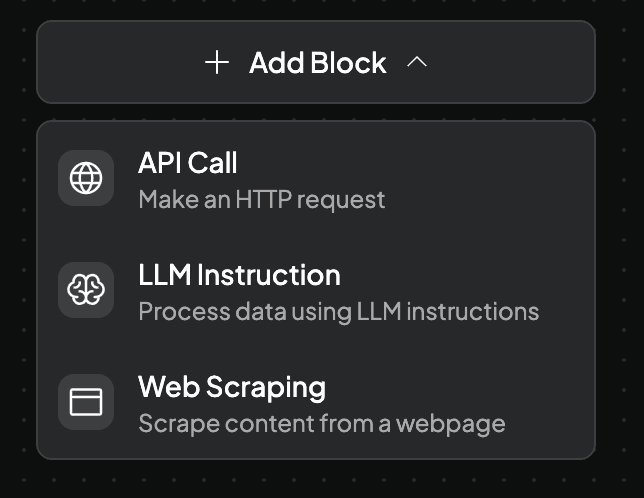
API Call, LLM Instruction, Web Scraping, Read File, Write File. No database node, no vector/embedding/reranker nodes, no conditional branching or loops documented anywhere. If what you're building needs any of that, you're out of the flow builder and into AnythingLLM's other path: custom Agent Skills — but those must be written in JavaScript/Node.js specifically, the docs themselves call the tooling immature ("may have some bugs, quirks, missing features"), and — this is the part that actually changes what you can ship — custom skills aren't available on AnythingLLM Cloud at all, only on self-hosted Docker (v1.2.2+) and Desktop (v1.6.5+).
MCP support has a similar shape: servers are added by hand-editing a JSON file (anythingllm_mcp_servers.json), and only MCP Tools are supported — not Resources, Prompts, or Sampling.
None of this makes AnythingLLM bad. It makes it a tool with a specific, fixed shape — five blocks, one config file, one scripting language, gated by which deployment you're on.
LM Studio: an excellent model runner, not a workspace
LM Studio doesn't have this problem because it isn't trying to solve it. Its own docs describe the whole product surface plainly: install, download models, load into memory, chat. There's no node canvas, no branching, no multi-step pipeline — and to be fair to LM Studio, it was never positioned as one. It's a model runner and chat UI, and a genuinely strong one, with real engineering behind it (MLX tensor parallelism, KV-cache checkpointing for agentic loops, a proper CLI). It added MCP client support with OAuth in v0.4.10, so a model can call out to external tools through chat.
We're not including a screenshot here for the same reason we're not criticizing it further — we went looking for an official one that fairly represents plain chat use and couldn't find one on their site that wasn't a marketing shot of a newer agentic feature. Rather than use an image that overstates the comparison, we're just saying it in words: LM Studio doesn't compete in the workflow-building category at all. If you want a fast, well-built way to run local models and chat with them, it's worth using. If you want to wire that model into a multi-step process, there's nothing here to wire it into.
What "not rigid" actually looks like in Aegis
This is the part we can just show you, because it's the app itself running.
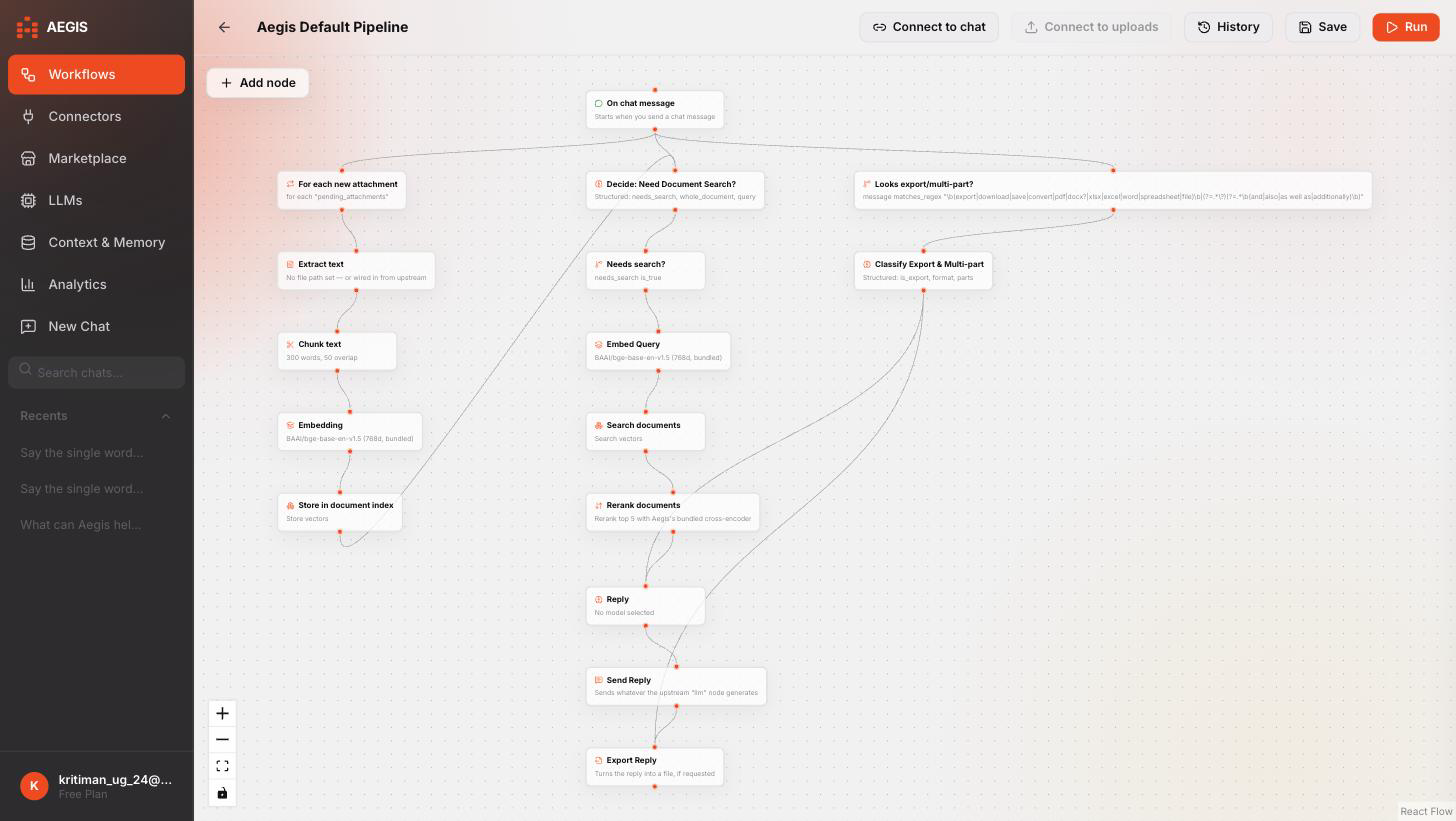
Every node kind connects to every other node kind — there's no fixed list of five block types standing between an idea and the canvas. Need a database step? Wire in a Database node and either browse your own tables or write raw SQL directly in the node. Need a specific extractor for a weird PDF, or a tool AnythingLLM's five blocks just don't cover? Connect it as an MCP server — from a curated catalog, a live search of the public MCP registry, a straight GitHub repo install, a remote hosted URL, or a raw pasted config, same as before — and it shows up as a real option in the relevant node's picker, extraction included, no separate scripting language and no Cloud-tier gate.
And because "anything can connect to anything" can also mean "anything can be wired together wrong," Aegis checks the shape of what you're connecting as you draw it:
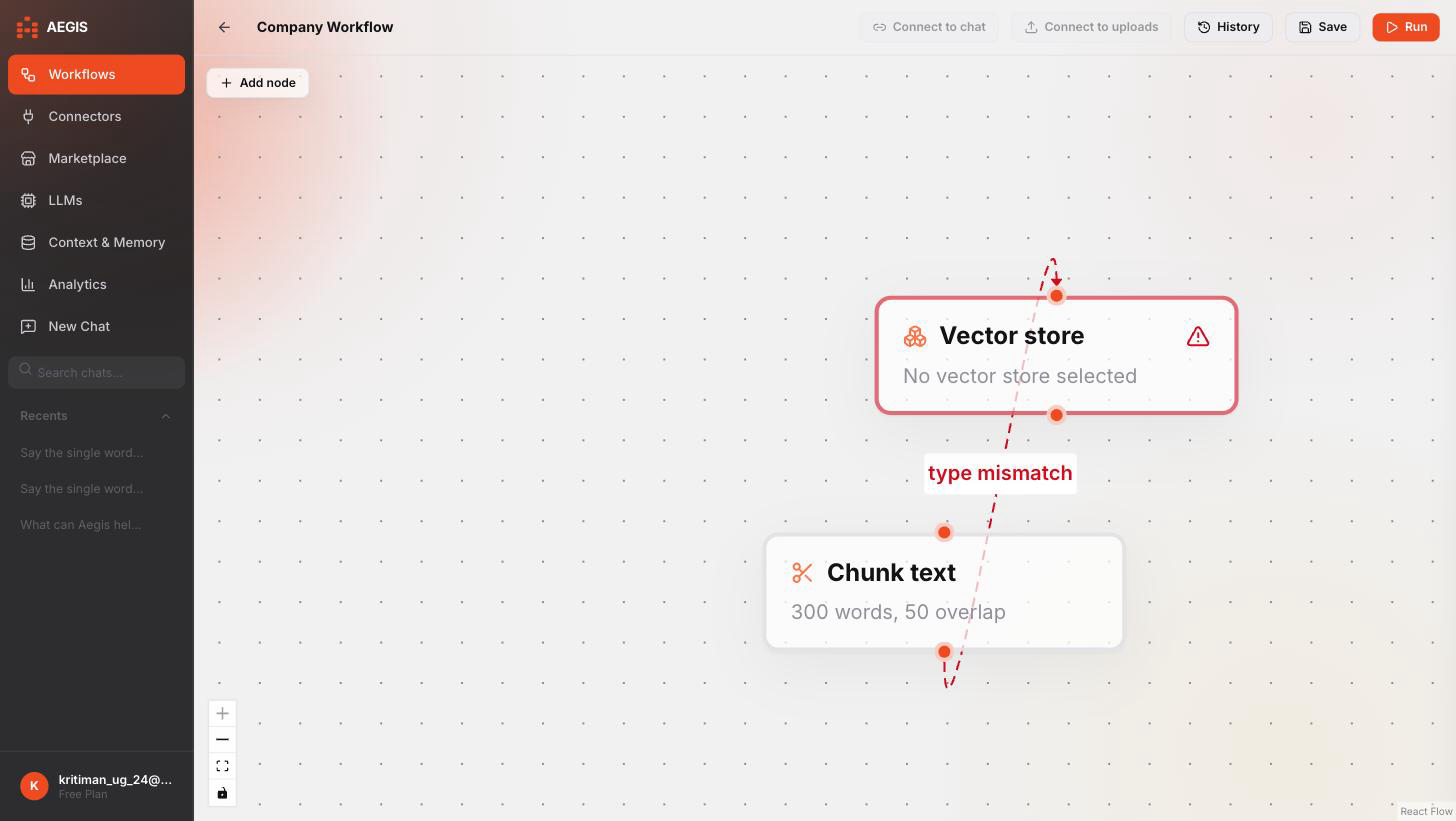
It warns, it doesn't block — a deliberate choice. A rigid tool would refuse the connection outright and get in the way of things you're doing on purpose; Aegis flags it and lets you decide, because sometimes what looks wrong at a glance is exactly what you meant.
Where we're still catching up
To keep this honest: Aegis doesn't have a hosted cloud tier yet, so if you specifically want to run agents on infrastructure you don't manage, that's not us today. Our MCP connectors are stdio/remote-HTTP based and don't yet cover every transport MCP defines. And AnythingLLM in particular has a longer track record and a much bigger community than we do right now — that matters for finding help when something breaks.
What we'd ask you to take from this isn't "Aegis has more features." It's that the shape of what you can build isn't fixed to five blocks or to whatever a chat window can do — it's a canvas, and it grows with whatever you connect to it.